3.4.7. File System Encryption with fTPM
3.4.7.1. Introduction
Data security is essential in modern embedded systems, be it industrial, automotive or IoT applications. This guide provides a reference implementation for root filesystem encryption by using Trusted Platform Module (TPM) protected keys on TI K3 platforms.
Yocto-Based Implementation:
This is a Yocto based implementation integrated into the Processor SDK. It provides recipes and configuration for LUKS2 full-disk encryption with automatic first-boot encryption and following boots decryption, all controlled through Yocto recipes. The implementation here leverages a firmware TPM (fTPM) running in OP-TEE to protect encryption keys, with secure persistent storage in TPM’s persistent handles. The solution provides strong data-at-rest protection without requiring discrete TPM hardware.
3.4.7.2. Key features
TPM-protected keys: Firmware TPM generates and seals encryption keys during first boot
Automatic In-place encryption: First-boot encryption (in-place) and next boot decryption happen automatically
Secure key storage: Keys stored in TPM persistent storage accessed through TPM 2.0 APIs
3.4.7.3. Concepts
3.4.7.3.1. Root Filesystem Encryption
Root filesystem encryption protects data at rest by encrypting the filesystem (root partition of SD card). This protection exists even if the storage device is physically removed from the system. The Linux kernel uses dm-crypt (Device Mapper Crypt) for block-level encryption, with LUKS (Linux Unified Key Setup) managing encryption parameters and key slots.
3.4.7.3.2. Firmware TPM (fTPM)
A firmware TPM (fTPM) implements the TPM 2.0 specification as a Trusted Application running within OP-TEE’s secure environment:
Key generation: Creates cryptographically strong keys using hardware entropy
Key sealing: Protects keys so only authorized parties can access them in a known secure state
Secure storage: Stores TPM state in tamper-resistant eMMC Replay Protected Memory Block (RPMB)
3.4.7.3.3. eMMC RPMB
Replay Protected Memory Block (RPMB) is a secure partition in eMMC storage:
Authentication: Only accepts authenticated write operations
Replay protection: Prevents replay attacks with write counters
Limited access: Only accessible through OP-TEE secure environment
The fTPM stores its persistent state in eMMC RPMB through OP-TEE’s secure backend.
3.4.7.4. Implementation Details
3.4.7.4.1. System Architecture
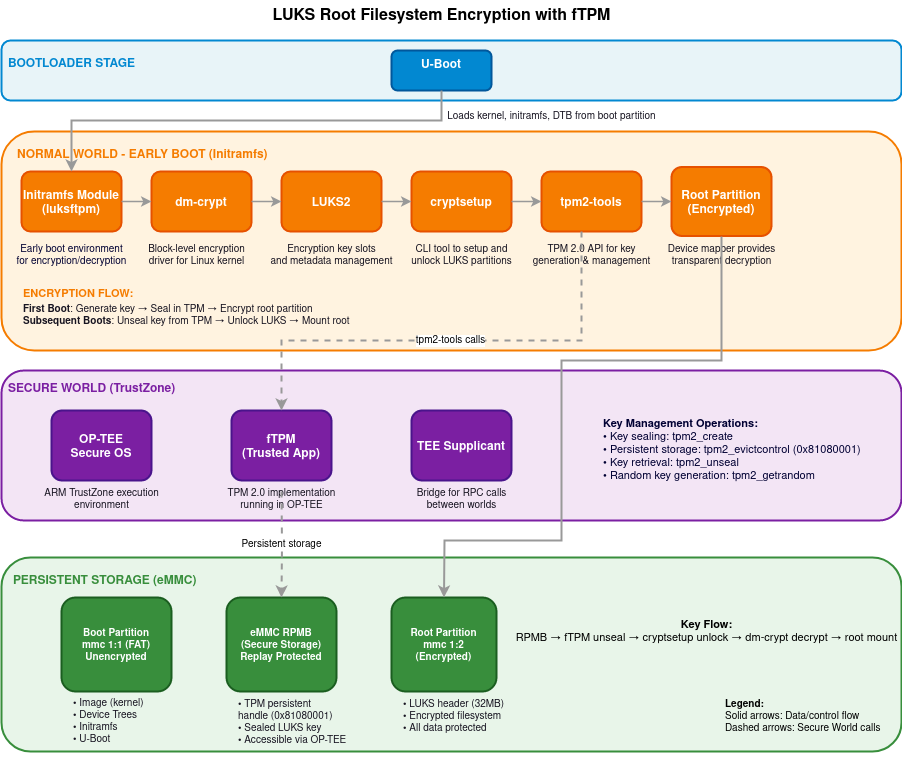
The filesystem encryption implementation consists of several components working together across the boot process:
Boot loader : U-Boot loads kernel, initramfs and DTBs into memory from unencrypted boot partition
Linux Kernel: Provides the core cryptographic functionality through the Device Mapper subsystem
Initramfs: Contains the early boot environment where encryption/decryption occurs
OP-TEE: Secure operating system running in TrustZone that hosts the firmware TPM
eMMC Storage: provides tamper-resistant key storage with RPMB
3.4.7.4.2. Boot Process Flow
The encryption system operates during the Linux boot process:
Boot loader Stage: U-boot loads the kernel and initramfs into memory
Early Boot: The kernel starts and mounts the initramfs as a temporary root filesystem
TPM Initialization: The firmware TPM is initialized within OP-TEE
Encryption Detection: The system checks if the root partition is already encrypted
Encryption/Decryption: Based on the detection result, the system either:
Performs first-time in-place encryption of the root filesystem
Retrieves the key from TPM and decrypts the existing encrypted filesystem
Root Switch: Control is transferred to the actual root filesystem
3.4.7.4.3. Key Management Flow
The encryption key lifecycle is managed securely:
Key Generation: During first boot, the TPM generates a random encryption key
Key Sealing: The key is sealed by the TPM, protecting it from unauthorized access
Key Storage: Sealed key data is stored in eMMC RPMB through the TPM’s secure storage
Key Retrieval: During later boots, the key is unsealed by the TPM
3.4.7.4.4. Encryption Process
The in-place encryption process follows these steps:
Filesystem Preparation: The filesystem is checked and resized to make room for LUKS headers
Space Verification: The system ensures at least 32MB is available for LUKS metadata
Encryption Initialization: LUKS headers are written to the beginning of the partition
Block Encryption: Data blocks are read, encrypted, and written back to storage
Filesystem Expansion: After encryption, the filesystem is expanded to use available space
3.4.7.5. Setup
The fTPM based filesystem encryption support is available in Yocto. The following section acts as the guide for setting it up. Please use Processor SDK - Building the SDK with Yocto as reference while following the below steps specific to LUKS:
Use the latest oe-config file, using the LUKS specific config.
Before building the SDK image, there are few prerequisites:
Writing keys to eMMC RPMB : The implementation here uses RPMB keys for secure persitance storage. Writing keys into RPMB is a one-time and non-reversible step, follow OP-TEE Secure Storage
Once the keys are written to RPMB, the optee-os and optee-client components in Yocto should be configured to make use of these hardware keys.
The following explains how Yocto should be configured:
optee-os: under the
meta-tilayermeta-ti-bsp/recipes-security/optee/optee-os-ti-overrides.incEnable
RPMBsupport.EXTRA_OEMAKE:append:k3 = " \ CFG_REE_FS=n \ CFG_RPMB_FS=y \ CFG_RPMB_WRITE_KEY=y \ CFG_RPMB_ANNOUNCE_PROBE_CAP=n \ "
optee-client: under the
meta-tilayermeta-ti-bsp/recipes-security/optee/optee-client_%.bbappendDisable RPMB emulation mode.
EXTRA_OECMAKE:append = " -DRPMB_EMU=OFF"u-boot: The kernel Image and dtbs are read from the root partition of SD by default. Since this implementation encrypts the root filesystem, u-boot needs to be configured to pick kernel image, dtbs and initramfs from the boot partition. This can be done by overriding the
CONFIG_BOOTCOMMAND:CONFIG_BOOTCOMMAND="setenv bootargs console=ttyS2,115200n8 earlycon=ns16550a,mmio32,0x02800000 root=/dev/mmcblk1p2 rootwait rootfstype=ext4; load mmc 1:1 0x82000000 /Image; load mmc 1:1 0x88080000 /ti-core-initramfs.cpio.xz; setenv initrd_size ${filesize}; load mmc 1:1 0x88000000 /<DTB_NAME>.dtb; booti 0x82000000 0x88080000:${initrd_size} 0x88000000"Additional configs: The following can be added in local.conf of yocto build:
To copy dtbs to boot patition for post encryption boot:
IMAGE_BOOT_FILES:append = " *.dtb"Adding free space in rootfs for LUKS encryption (since LUKS expects atleast 32MB of free space for header post resize2fs operations):
IMAGE_ROOTFS_EXTRA_SPACE = "65536"
Some other useful configurations (not mandatory to have):
In order to use tpm2 tools in Linux command line, add following in local.conf:
IMAGE_INSTALL:append = " \
    tpm2-tools \
    tpm2-tss \
    libtss2-tcti-device \
"
The size of initramfs image can be reduced by using busybox:
VIRTUAL-RUNTIME_init_manager:pn-packagegroup-ti-core-initramfs = "busybox"
VIRTUAL-RUNTIME_dev_manager:pn-packagegroup-ti-core-initramfs = "busybox"
3.4.7.6. dm-crypt performance
The first boot involves encryption of complete root filesystem using the ARM aes-generic (software implmentation), giving around 17.0 MB/s of performance. This makes use of cryptsetup reencrypt which reads, encrypts and writes back data. Therefore, the first boot is expected to take more time dependending on the size of filesystem.
The next boots involve decryption of data, giving around 86 MB/s of decryption throughput.
3.4.7.7. Security Considerations
3.4.7.7.1. Reference Implementation
This implementation serves as a reference design that demonstrates the integration of filesystem encryption with firmware TPM. It is not intended for direct use in production environments without appropriate security review and customization including:
Threat model evaluation: a thorough threat assessment should be conducted before deployment
Key management: The default TPM persistent handle (0x81080001) should be reviewed for security requirements
Boot process hardening: The initramfs module may need modifications to align with specific security policies
Recovery mechanisms: Production implementations may require key recovery procedures
3.4.7.7.2. Further Enhancements
Implementation of this reference design can have following enhancements:
Integrating with secure boot: Establish a verified chain of trust from ROM to filesystem
Passphrase Recovery: Incase the TPM keys become inaccessible during boot, the current implementation doesn’t use any backup passphrase recovery method resulting in potential data loss. Using a passphrase would reduce risk of data loss but introduces additional security considerations.
Measured boot: Add TPM PCR measurements to bind keys to verified software state, the current reference doesn’t use PCR measurements
Audit logging: Add secure logging of encryption/decryption operations for compliance purposes