1.3. Flashing Instruction
These instructions are for the AM62x SK EVM. For flashing the Beagle Play, see the Beagle Play.
1.3.1. DFU Recovery
It’s possible to put the AM62x SK EVM in USB DFU mode, which allows
loading bootloaders over DFU. This is done via the snagboot tool.
This is useful for initial flashing or recovering boards which have broken
bootloaders.
1.3.1.1. Installation and setup
Install snagboot 1.3.0 following the official instructions Make sure to install the udev rules as documented:
$ snagrecover --udev > 50-snagboot.rules
$ sudo cp 50-snagboot.rules /etc/udev/rules.d/
$ sudo udevadm control --reload-rules
$ sudo udevadm trigger
Tip
If Snagboot cannot be installed, it’s possible to boot the initial bootloaders from an SD card. Follow Android Bootloader on SD Card if you encounter issues with Snagboot.
1.3.1.2. eMMC flashing
1.3.1.2.1. Flashing instructions
Once the build is complete, follow the steps below to flash the images to eMMC.
Change the boot mode DIP switches to DFU mode:
Switch Label
SW2: 12345678
SW3: 12345678
USB DFU
00000000
11001010
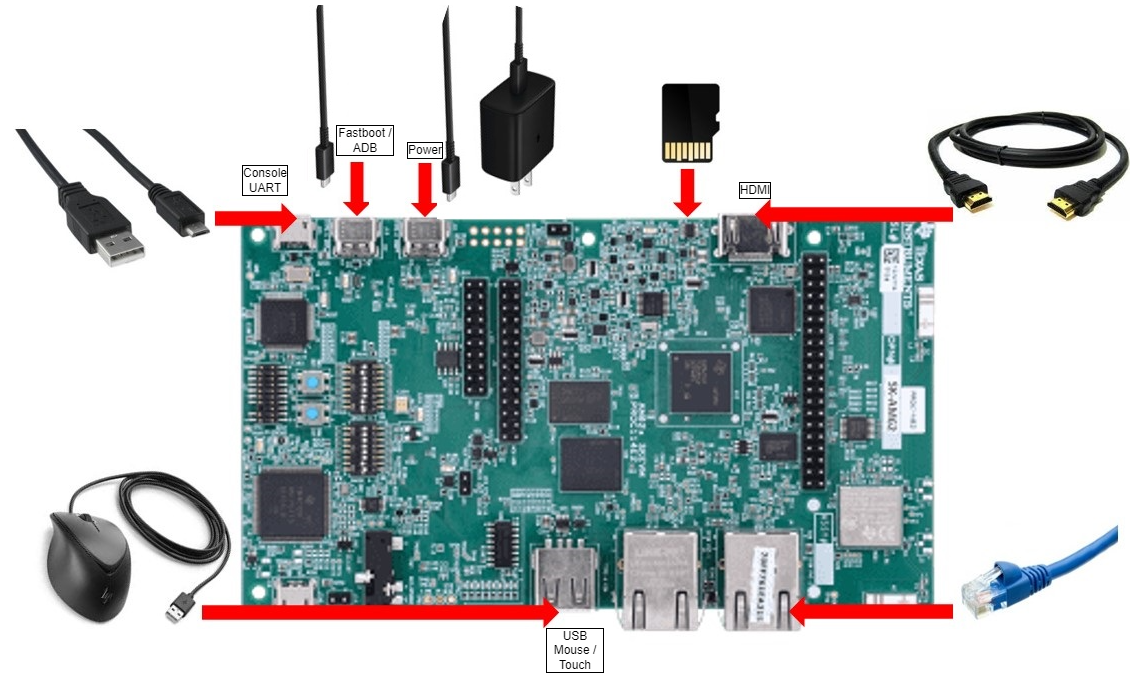
Ensure the device is plugged in with USB host and debug UART/serial debug
Open a terminal debugger to view console output from the device:
$ sudo picocom -b 115200 -r -l /dev/ttyUSB0
The following sequence assumes that 2 terminals are open:
On the left, a terminal to send commands from the PC to the device
On the right, the
picocomconsole to run commands on the device
PC
Device
run
snagrecover:# If you are using binaries built locally $ cd out/target/product/am62x (OR) # If you are using pre-built binaries from SDK download page $ cd AM62x_11.00.01_emmc # for AM62x SK EVM (GP) $ snagrecover -s am625 -f ./am62x-sk-evm.yaml # for AM62x SK EVM (HS-FS) $ snagrecover -s am625 -f ./am62x-sk-evm-hsfs.yaml # for AM62x LP SK EVM (GP) $ snagrecover -s am625 -f ./am62x-lp-sk-evm.yaml # for AM62x LP SK EVM (HS-FS) $ snagrecover -s am625 -f ./am62x-lp-sk-evm-hsfs.yaml
produces:
Starting recovery of am625 board
Installing firmware tiboot3
Searching for partition id...
Downloading file...
Could not read status after end of manifest phase
Done
Done installing firmware tiboot3
Installing firmware tispl
Searching for partition id...
Downloading file...
Done
Done installing firmware tispl
Installing firmware u-boot
Searching for partition id...
Downloading file...
Done
Sending detach command...
Done installing firmware u-boot
Installing firmware u-boot
Searching for partition id...
Downloading file...
Done
Sending detach command...
Done installing firmware u-boot
Done recovering am625 board
Halt the autoboot countdown by pressing any key:
U-Boot SPL 2023.04-g83660642 (Jul 15 2024 - 11:30:29 +0000)
SYSFW ABI: 4.0 (firmware rev 0x000a '10.0.6--v10.00.06 (Fiery Fox)')
SPL initial stack usage: 17048 bytes
Trying to boot from DFU
##########################################################DOWNLOAD ... OK
Ctrl+C to exit ...
##############################################################DOWNLOAD ... OK
Ctrl+C to exit ...
Authentication passed
Authentication passed
Authentication passed
init_env from device 10 not supported!
Authentication passed
Authentication passed
Starting ATF on ARM64 core...

NOTICE:  BL31: v2.10.0(release):09.02.00.009
NOTICE:  BL31: Built : 11:30:24, Jul 15 2024

U-Boot SPL 2023.04-g83660642 (Jul 15 2024 - 11:30:56 +0000)
SYSFW ABI: 4.0 (firmware rev 0x000a '10.0.6--v10.00.06 (Fiery Fox)')
SPL initial stack usage: 1904 bytes
Trying to boot from DFU
#####DOWNLOAD ... OK
Ctrl+C to exit ...
Authentication passed
Authentication passed


U-Boot 2023.04-g83660642 (Jul 15 2024 - 11:30:56 +0000)

SoC:   AM62PX SR1.0 HS-FS
Model: Texas Instruments AM62P5 SK
DRAM:  2 GiB (effective 8 GiB)
Core:  80 devices, 30 uclasses, devicetree: separate
MMC:   mmc@fa10000: 0, mmc@fa00000: 1
Loading Environment from MMC... OK
In:    serial
Out:   serial
Err:   serial
Net:   eth0: ethernet@8000000port@1, eth1: ethernet@8000000port@2
Hit any key to stop autoboot:  0
=>
Ensure the default U-Boot environment is configured with:
=> env default -f -a; saveenv;
## Resetting to default environment
Saving Environment to MMC... Writing to MMC(0)... OK
Tip
By default, no Device-Tree Overlays are selected. Follow this link to configure Device Tree Overlay Support
Enable fastboot mode on the device by executing below command.
Before running this, make sure USB-C cable is connected from the host PC to the EVM:
=> fastboot 0Run the the
flashall.shscript to start flashing the binaries to eMMC:# If you are using binaries built locally $ cd out/target/product/am62x (OR) # If you are using pre-built binaries from SDK download page $ cd AM62x_11.00.01_emmc # for AM62x SK EVM (GP) $ sudo ./flashall.sh --board am62x-sk # for AM62x SK EVM (HS-FS) $ sudo ./flashall.sh --board am62x-sk --hsfs # for AM62x LP SK EVM (GP) $ sudo ./flashall.sh --board am62x-lp-sk # for AM62x LP SK EVM (HS-FS) $ sudo ./flashall.sh --board am62x-lp-sk --hsfs board: am62x-sk Fastboot: ./fastboot Generating boot loader image ... mkfs.fat 4.2 (2021-01-31) Generating boot loader image: DONE Create GPT partition table OKAY [ 0.032s]
Writing GPT: success!
dwc3-generic-peripheral usb@31000000: request 00000000f7ec4040 was not queued to ep1in-bulk
** Bad device specification mmc tiboot3_a **
** Bad device specification mmc tiboot3_a **
Couldn't find partition mmc tiboot3_a
dwc3-generic-peripheral usb@31000000: request 00000000f7ec4040 was not queued to ep1in-bulk
Tip
If you get
mcopycommand not found error on Linux PC, install themtoolspackage:$ apt-get install mtools
Warning
It’s possible that the in-memory partition layout is still from an older system.
In that case, we can observe flashing errors similar to:
writing 'tiboot3'...
FAILED (remote: invalid partition or device)
When that happens:
Reboot into the newly flashed boot loader with
$ fastboot reboot bootloaderRestart the flashing from U-Boot environment.
Once the flashing is complete, power off the board
Change boot mode DIP switches to boot from eMMC user partitions and power cycle the board:
Switch Label
SW2: 12345678
SW3: 12345678
EMMC (with UDA)
00000000
11000010
Board should boot the Android images now.